I'm playing a lot of EVE Online recently and am currently in an alliance that uses the older Teamspeak 2 client to talk with eachother. As there don't seem to be any Teamspeak 2 overlay applications that work for Windows 7, I've created one of my own.
Head over to the TS2Overlay page on my blog for the details. Comments go there as well.
Saturday, November 6, 2010
Friday, July 16, 2010
Overclocking the MSM7200 / MSM7201a
Btw, the MSM7201a is a 528MHz processor. Some have reported to be able to clock it at 787MHz before it hangs. That's a pretty insane overclock if you tell me. For me it's stable at 710MHz. I can push it to 750MHz, but it'll lock up as soon as I do something heavier on the device, like watching a movie.
Sunday, May 16, 2010
CPU speed control for the HD2, including overclock!
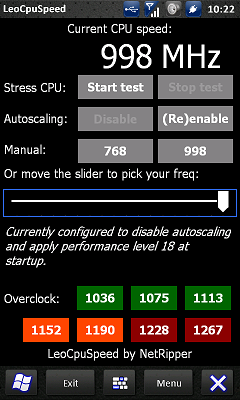
Today I've released a new app for the HD2 to control the CPU speed of the device. You can scale the speed anywhere between 128MHz and 998MHz and lock it by disabling the autoscaling feature that HTC put in. Having the CPU at 998MHz all the time (as opposed to the 768MHz default idle speed), you don't notice the battery increase. I didn't at least.
I've also ported some of the code from the Nexus One linux kernel to allow overclocking. Unfortunately it's not possible (or I haven't found a way yet) to increase core voltage, so you can't overclock too far. You should be fine overclocking to 1.1ghz. Overclocking to 1.2ghz is tricky already and I've never been able to clock it at 1.228ghz or higher without it instantly locking up.
Also one other major limitation is that overclocking currently only works on AC power, as on battery the phone somehow enforces the cpu speed at 998mhz (or more specifically, last used performance level) every 500 milliseconds. I'm still trying to figure out how to fix this. :-)
Head over to the thread on XDA for more details.


I've also ported some of the code from the Nexus One linux kernel to allow overclocking. Unfortunately it's not possible (or I haven't found a way yet) to increase core voltage, so you can't overclock too far. You should be fine overclocking to 1.1ghz. Overclocking to 1.2ghz is tricky already and I've never been able to clock it at 1.228ghz or higher without it instantly locking up.
Also one other major limitation is that overclocking currently only works on AC power, as on battery the phone somehow enforces the cpu speed at 998mhz (or more specifically, last used performance level) every 500 milliseconds. I'm still trying to figure out how to fix this. :-)
Head over to the thread on XDA for more details.
Monday, May 10, 2010
Irssi tips for newbies
A colleague of mine recently installed irssi and I thought it'd be nice to give him some hints on scripts and some handy commands etc. After writing that up I thought it couldn't hurt sharing it with the world as well. Even though this is written for irssi newbies, it's not written for linux newbies :-)
1. Install scriptassist
Scriptassist is a script that will make your life within irssi a bit easier. It will help you install new scripts and add them to autorun.
# mkdir ~/.irssi/scripts/autorun
# cd ~/.irssi/scripts# wget http://scripts.irssi.org/scripts/scriptassist.pl

1. Install scriptassist
Scriptassist is a script that will make your life within irssi a bit easier. It will help you install new scripts and add them to autorun.
# mkdir ~/.irssi/scripts/autorun
# cd ~/.irssi/scripts
# cd autorun
# ln -s ../scriptassist.pl
In irssi just type: /script load scriptassist
It may fail to load due to missing perl dependencies. Resolve these by installing the missing dependencies and try again.
When it loads correctly, you'll get info on how to use it with: /scriptassist help
2. Some nice scripts
Here's a few scripts that I'm using within irssi myself.
3. Some handy commands
Some aliases just make life easier. Especially when working on a mobile device in which you cannot use the alt key to change channels :-)
In irssi just type: /script load scriptassist
It may fail to load due to missing perl dependencies. Resolve these by installing the missing dependencies and try again.
When it loads correctly, you'll get info on how to use it with: /scriptassist help
2. Some nice scripts
Here's a few scripts that I'm using within irssi myself.
- autowhois: when someone queries you, it does a whois and displays it in the query.
- autocycle: autorejoin after kick (not always appreciated in all channels and can result in ban)
- binary: encode/decode for fun (01101000 01100101 01101100 01101100 01101111 00100000 01110111 01101111 01110010 01101100 01100100)
- kenny: same (mfpmpppmfpmfppf fppppfpffpmfmpm)
- nickcolor: gives each nick a seperate color (edit nickcolor.pl --> "my @colors = qw/3 7 9 10 11 12 13/;" for my recommended color set to prevent your eyes from pinching)
- queryresume: gives the last 10 lines of the previous time you had a query with that person
- splitlong: if your text doesn't fit on one line, it splits it over multiple ("/set splitlong_max_length 460" to be on the safe side)
3. Some handy commands
- Make irssi remember what channel is in what window: /layout save
- Current people in channel: /n (or /names)
- Current topic: /t
- Close window (& part if chan): /wc (/window close)
- Search through current window: /last mysearch
- Scroll up 10 lines via command: /sb goto -10
- Scroll back all the way down: /sb end
Some aliases just make life easier. Especially when working on a mobile device in which you cannot use the alt key to change channels :-)
/alias 1 /window goto 1/alias 2 /window goto 2/alias 3 /window goto 3/alias 4 /window goto 4/alias 5 /window goto 5/alias 6 /window goto 6/alias 7 /window goto 7/alias 8 /window goto 8/alias 9 /window goto 9/alias 10 /window goto 10/alias 11 /window goto 11/alias 12 /window goto 12/alias 13 /window goto 13/alias 14 /window goto 14/alias 15 /window goto 15/alias 16 /window goto 16/alias 17 /window goto 17/alias 18 /window goto 18/alias 19 /window goto 19/alias 20 /window goto 20/alias c /window close/alias dns /exec host $-
/alias figlet /exec -o figlet -s $-
5. Configuration settings
- Logging (only logs queries, add "pub" after "msgs" seperated by a space to also log channels)
/set autolog ON
/set autolog_level msgs
/set autolog_path ~/irclogs/$tag/$0.log - Away log
/set awaylog_colors ON
/set awaylog_level msgs hilight
/set awaylog_file ~/.irssi/away.log
Wednesday, March 10, 2010
Linux on HD2: IRQ problem solved!
Just an update. Last few weeks we've been working on something we named "the irq problem". After registering some interrupts, whenever the first one fired, it would cause an infinite amount of "bad IRQs". Finally after a bit of coincidence that we read along some of the problems randomblame was having, we saw some interesting code in the entry-macro.S file, patched by vladone. This was the solution to the irq problem.
It's typical. You do really a lot of research on something, and it turns out to be something so small (only three lines of assembly code). As you can see on the git repo, getting rid of this blocking issues allows us to finally do some other work.

It's typical. You do really a lot of research on something, and it turns out to be something so small (only three lines of assembly code). As you can see on the git repo, getting rid of this blocking issues allows us to finally do some other work.
Tuesday, March 9, 2010
Modded HTC Flashlight app
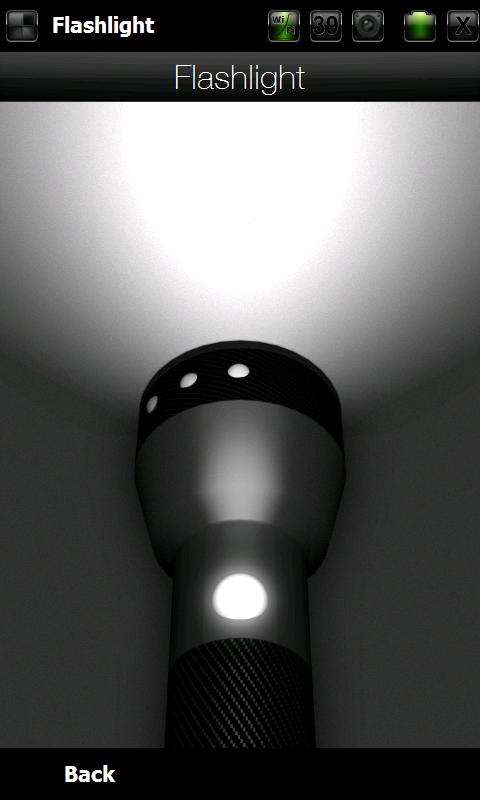
It was fun to figure out how to fix the exe to skip the demo, so I took on the challenge and fixed it. Check out the thread over at xda-developers ([MOD] HTC Flashlight, no demo at startup).
Sunday, January 31, 2010
Linux on HD2 source code (so far)
Just a small update. I managed to get a git up a few days ago on linuxtogo.org and today I've managed to tidy up and commit the code that I have so far to this git.
I also planned on making a guide to build the kernel from scratch, but didn't get to that yet. You can take a look however at other guides for other phones, and just swap the git repository with the one linked above. Here is a guide for the Blackstone. I suggest you use the prebuilt toolchain by Google though. Otherwise you may run into compile issues regarding floating point instructions.
For a HaRET build you can check www.netripper.com/leo/
As default.txt you can use:

I also planned on making a guide to build the kernel from scratch, but didn't get to that yet. You can take a look however at other guides for other phones, and just swap the git repository with the one linked above. Here is a guide for the Blackstone. I suggest you use the prebuilt toolchain by Google though. Otherwise you may run into compile issues regarding floating point instructions.
For a HaRET build you can check www.netripper.com/leo/
As default.txt you can use:
# MTYPE of the HTCLEOHave fun!
set mtype 2524
# This is the physical location of the first memory bank
set ramaddr 0x20000000
# 224MB ram, just a guess though. Not sure how large
# the first bank is (or the second).
set ramsize 0x0E000000
# You must use "Image" instead of "zImage", as the
# decompression routine fails on the Leo!
set kernel Image
# The most important parameter is "lpj=8000000"
# here, without it, the kernel hangs during boot
# when it tries to calculate the loops per jiffie.
set cmdline "init=/init root=/dev/ram mem=64M lpj=8000000"
# Boot the image
bootlinux
Subscribe to:
Comments (Atom)